
Family Fridays
Practical Skills for younger people
Various In-Person Courses
Coming soon
COURSE INFORMATION
Course Dates
Build a Robot Car
TBD
PROGRAM OVERVIEW
3 Fridays - 2 Hours per day
This series of short courses is designed to provide young people with hands-on experience in various technical skills while encouraging collaboration with their parents. Each course offers an engaging environment where participants can explore fields such as engineering, design, and manufacturing.
By working alongside their parents, students will gain practical knowledge and develop competencies that are valuable in today’s job market. The program aims to inspire creativity, build confidence, and prepare families with skills that can lead to future career opportunities.
If you're interested in a variant and don't see it listed or scheduled, let me know and we can get it going.
Basic Robotics
Build a Robot Car
Students will learn to build a simple robot car using an Arduino microcontroller. They will assemble various components like motors and a chassis and learn to program it with the Arduino IDE to control its movement.
By experimenting and troubleshooting their designs, students will gain valuable experience in robotics and programming. At the end of the course, each student will have a working robot car and the skills to pursue more advanced projects

-
Proficiency in using Arduino microcontrollers for robotics applications
-
Ability to assemble various robot components (e.g., motors, chassis)
-
Skills in programming using the Arduino IDE
-
Understanding of basic motor control and sensor integration
-
Experience in troubleshooting and debugging robotic designs
-
Knowledge of circuitry and electronic components related to robotics
-
Hands-on experience in project planning and execution
-
Capability to design and implement simple robotic systems
-
Exposure to fundamental principles of robotics and automation
Skills Gained
Blender / Unreal Engine
Make a Game World
This course teaches the basics of 3D modeling and game development using Blender and Unreal Engine, with a particular focus on world-building.
Participants will create 3D models and learn how to integrate them into an interactive environment within Unreal Engine.
The goal is to provide foundational knowledge and skills in both software programs for aspiring 3D designers and game developers, emphasizing the creation of immersive and engaging worlds.
Skills Gained
-
3D Modeling Techniques: Understanding fundamental modeling tools and concepts in Blender.
-
Texturing and Materials: Creating and applying textures and materials to 3D models to enhance realism.
-
Lighting and Rendering: Learning about lighting setups and rendering techniques to produce visually appealing scenes.
-
Animation Basics: Introduction to basic animations, including object movement and character rigging.
-
Game Engine Fundamentals: Navigating Unreal Engine's interface and understanding its core functionalities.
-
World Building: Designing cohesive and immersive game environments through layout and environmental storytelling.
-
Asset Integration: Importing and optimizing 3D models created in Blender for use in Unreal Engine.
-
Level Design Principles: Understanding how to create engaging and playable game levels.

MIG Welding
Welding
In this introductory course on MIG welding, participants will learn the fundamental principles and techniques of this versatile welding method. Students will gain hands-on experience with MIG welding equipment, understand safety protocols, and practice basic welding techniques, such as bead placement and joint preparation.
By the end of the course, participants will have a solid foundation in MIG welding, enabling them to work on simple projects and develop their skills further.

Skills Gained
-
Understanding of fundamental principles of MIG welding
-
Hands-on experience with MIG welding equipment and tools
-
Knowledge of safety protocols and best practices in welding
-
Proficiency in basic welding techniques
-
Ability to set up and adjust MIG welding machines
-
Familiarity with different types of welding wires and shielding gases
-
Experience in working on simple welding projects
-
Awareness of common welding defects and troubleshooting techniques
Soldering
In this SMD soldering course, participants will learn essential techniques for precision soldering in electronics.
The course covers the basics of soldering tools and materials, with hands-on experience in soldering surface-mount components on PCBs. Key topics include soldering techniques, heat management, and troubleshooting.
By the end, students will acquire the skills needed to confidently work with SMD technology in basic electronic projects.

Skills Gained
-
Proficient use of soldering tools and equipment
-
Understanding of soldering materials and their properties
-
Application of precision soldering techniques for SMD components
-
Ability to read and interpret electronic circuit diagrams
-
Knowledge of heat management strategies to prevent component damage
-
Troubleshooting common soldering issues and defects
-
Skills in working with printed circuit boards (PCBs)
-
Familiarity with safety practices in soldering work
-
Basic knowledge of electronic components and their functions
-
Capability to complete basic electronic projects involving SMD technology
Composite Fabrication
Build a Pickleball Paddle
In this course, students will learn the fundamentals of composite fabrication by designing and constructing their own pickleball paddles using carbon fiber and honeycomb core materials. The course covers essential techniques such as layup, curing, and finishing, along with the structural benefits of these materials.
Participants will move from design concepts to final assembly, leaving with a fully built paddle and a solid understanding of composite manufacturing processes. This course is ideal for those interested in pursuing careers in the composite industry, where they can apply their skills in sectors like aerospace, automotive, and marine engineering.

Skills Gained
-
Composite Material Knowledge: Understanding properties and applications of carbon fiber and honeycomb core materials.
-
Design Fundamentals: Learning design principles specific to composite fabrication, including aesthetics and functionality.
-
Layup Techniques: Mastering the process of layering materials for optimal strength and performance.
-
Curing Processes: Gaining insights into curing methods and the importance of proper curing for structural integrity.
-
Finishing Techniques: Learning how to properly finish and polish composite surfaces for a professional appearance.
-
Structural Engineering Principles: Understanding the benefits of composite materials in terms of weight reduction and strength.
-
Fabrication Skills: Gaining hands-on experience in the construction and assembly of custom composite products.

CAD 3D Design
Design - Print - Mill
This is a course on the workflow involved in turning ideas into tangible products, by either 3d printing or CNC machining.
Participants will learn the fundamentals of computer-aided design (CAD) and how to create and modify 3D models.
Topics will include preparing designs for 3D printing and traditional machining methods, understanding different technologies and materials, and key design considerations for effective fabrication.
Skills Gained
-
Proficiency in computer-aided design (CAD) software for 3D modeling
-
Ability to create and modify 3D models for various applications
-
Skills in preparing designs for 3D printing and CNC machining
-
Understanding of materials and their properties relevant to design
-
Knowledge of best practices for effective fabrication and production
-
Capability to optimize designs for performance and manufacturability
-
Experience in troubleshooting common design and printing issues
RC Basics
Build an RC Airplane
In this course, participants will assemble a remote-controlled (RC) airplane kit. They will learn about the basic components involved in RC flight, including airframes, motors, and control systems.
The focus will be on practical skills such as following assembly instructions, performing basic troubleshooting, and becoming familiar with the tools used in model building.
By the end, participants will have a completed RC airplane to fly and a clear understanding of the fundamental elements that contribute to its flight capabilities.

Skills Gained
-
Technical Knowledge: Understands RC airplane components and basic aerodynamics principles.
-
Assembly Skills: Capable of accurately assembling complex kits with attention to detail.
-
Problem Solving: Able to troubleshoot and resolve common operational issues.
-
Tool Proficiency: Familiar with various tools used in model building, indicating hands-on experience.
-
Safety Awareness: Practices safety protocols when handling tools and electronics.
-
Pre-Flight Inspections: Skilled in conducting checks to ensure equipment readiness for operation.
-
Remote Operation: Proficient in basic remote control techniques, demonstrating coordination and adaptability.
Raspberry Pi Computer Tech
Build a Mini Computer
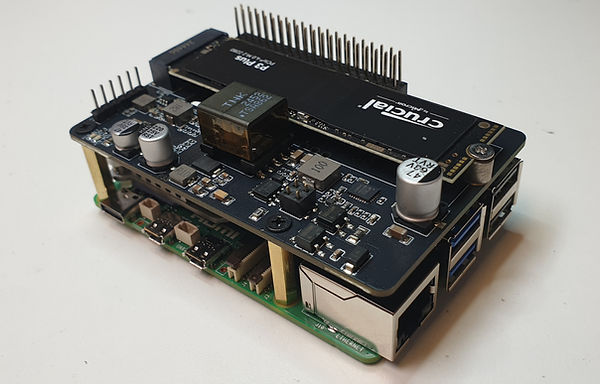
In this class, students will learn to build and configure their own Raspberry Pi computers, incorporating a Raspberry Pi hat for M.2 expansion and a compact 7-inch touch monitor.
Participants will gain an understanding of the Raspberry Pi hardware and software, including the Linux operating system, which powers the Raspberry Pi.
Throughout the course, students will assemble the components to create a functional, portable computing system and develop projects using their new setup.
By the end of the session, each participant will have a fully operational Raspberry Pi setup and the skills to further enhance their projects within the Linux environment.
Skills Gained
-
Building and configuring Raspberry Pi computers
-
Incorporating Raspberry Pi hats for hardware expansion
-
Setting up and using a compact 7-inch touch monitor
-
Understanding Raspberry Pi hardware and software components
-
Navigating and utilizing the Linux operating system
-
Assembling multiple components into a portable computing system
-
Developing and executing projects using the Raspberry Pi setup

Course Dates
Build a Robot Car
TBD
The Pre-Registration List
To help ease the college registration for our CTECH students we've created a spreadsheet to hold students' place in class while they wait for classes to be scheduled, vouchers to be received, voucher access (I believe it's a month before class), or any other complication in the process. We can add you to the spreadsheet before you get a CTCLink ID, but you will need to have one eventually.
We'll reach out to you as we get closer to the class start date.
If you see a class you'd like to get in, you can contact us to be added to this spreadsheet.
You can also simply email me and I can add you as well.
Damian Cianci
dcianci@edmonds.edu
The Registration Process
Register by phone between 9am and 4pm PDT (This is the easiest way)
425-640-1840
Important - You will need a CTCLink ID number in order for us to help you over the phone or in person. You can follow the steps below to get one.
Fill out an application to Edmonds College:
https://apply.ctc.edu/user
* This can take 1-5 business days to get your ID
A few notes for your application:
Enroll as: "First Year"
Program: "Professional Technical"
Term: "_____" (Season plus year, such as: Spring 2023)
Degree or Certificate: "Undecided - Professional Technical"
Once you have received your CTC Link ID number please let us know and we can get you registered for your class.
Register Online (This is the most complicated way)
Washington State colleges are now using CTCLink for all student services.
-
Follow the link below - login in or create an account
-
Go to "Student Homepage"
-
Choose "Manage Classes"
-
"Class Search and Enroll"
-
Choose Edmonds College and the quater (Control + F to search page)
-
Search for class name or number (Class Number will get you to where you want faster)
Online Registration Login Page - CTCLInk
NOTE - All our classes fall under "Special Topics: Manufacturing".
Click here to get notified of upcoming classes